A long, somewhat technical, maybe somewhat boring description of some of my journey re-discovering my love of radio from my childhood.
Steven Brown – The Kilted IT Guy
What is P25?
P25 is a digital radio standard developed with Public Safety agencies (Police, Fire, EMS, etc) in mind. Having a standard means 2 different radio systems are able to relay calls between them seamlessly. This means that when RCMP officers need to speak to the city police in Regina (or anywhere else) they can do so from anywhere so long as their radio is able to connect to the PPSTN radio tower network. P25 can be internet connected meaning that cell phones, apps and computers can also interact with the network. Being internet capable means that different radio system can connect to each other for example, PPSTN and City of Regina are two different systems on different infrastructure. This interconnectivity allows radios to roam on different networks and interact with their home system simultaneously.
How do I listen to these systems?
Because these systems transmit and receive their calls and information digitally, it is not possible to use the “police scanners” of old. Instead we need specialized radios like these. These radios can cost hundreds of dollars but do allow you the freedom to scan and listen where ever you are. But what if you could do the same thing with a laptop, tablet, smartphone or home PC?
This where RTL-SDR comes in.
What used to cost hundreds or thousands of dollars in radio equipment and a workbench to put it all on, can now fit in the palm of your hand for about $40. There are two differences between a “real” radio and the cheap radio sticks that I have encountered.
- The RTL-SDR sticks cannot transmit, they receive radio signals only
- The RTL-SDR has some limitations on receiving and amplifying weak signals and sometimes suffers from radio frequency noise (you get what you pay for but there are things that can be done about this).
After getting the radio sticks setup, we should be ready to begin scanning.
Now that we have the radio receiver sorted out, what kind of antenna do we need? In my case, I built a “planar antenna” due to it’s wide bandwidth abilities (it works well at various frequencies and not built for one particular purpose) and it’s cost effectiveness to build. Usually when building an antenna, one considers the frequency requirements and builds an antenna around that. Because I am monitoring multiple devices and systems which don’t all have frequencies close together, I don’t want to build an antenna designed for FM radio when I need to receive signals at 800MHz.
P25 Radio uses a “control channel” to direct radios on the network on where and when they may transmit and receive calls. Because these P25 radio systems use multiple channels over multiple frequencies, we will need at least 2 of the radio sticks to effectively monitor and listen to the calls on these types of systems. Our first job is to find the control channel for the system we want to listen to. Lucky for us Radio Reference has a public database of radio systems and where to find them.
Provincial Public Safety Telecommunications Network
Now that we know where to listen, we’ll need something to decode the digital data on the control channel.
There are lots of options and I have settled on SDRTrunk as my software of choice.
With the City of Regina system there are currently only 2 towers in the city. One downtown on the McCallum Hill tower at 1874 Scarth St (identified on the network as Site 2) and another in the NW at Fire Station 6 on Rink Ave (Site 3). From what I’ve been able to Google, Site 1 used to be on the City of Regina building on Victoria Ave but has been decommissioned. Some of the City budget reports have indicated there may be a new tower going up in the SE somewhere in the near future.
Because I live closer to the Rink Ave tower, and it has the strongest signal for me, this is the control channel I have chosen to listen to.
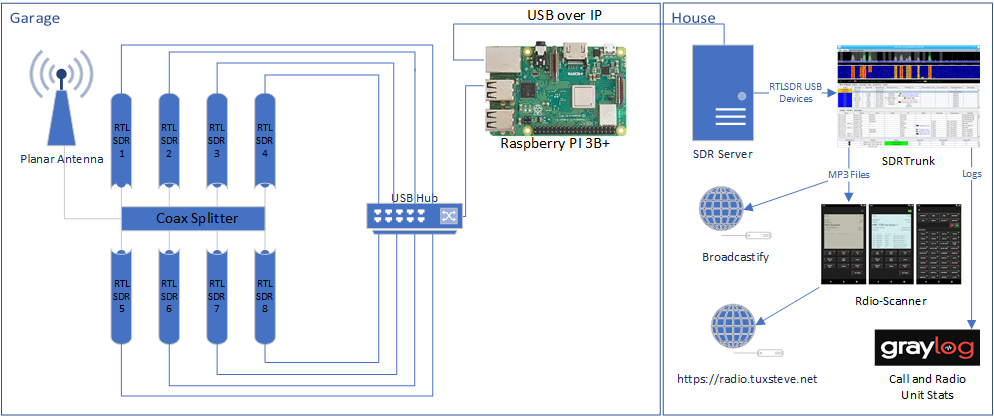
Lets take a look at the hardware and software involved: